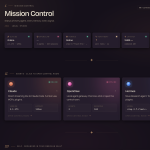
Agentic OS Command Center: One Screen for Every Agent (2026)
Let me break this down. An agentic OS command center is the single screen where you run and oversee every AI agent and workflow you use — models, skills, tasks and logs, all in one place.
It turns a pile of command-line agents into one system you actually control. Here’s what it is and how to get one.
Last updated: July 2026.
Key takeaways
A command center is mission control for all your agents and workflows.
Run agents, switch models, schedule tasks and see live activity — from one screen.
It beats the terminal: oversight, history and one-click control.
It’s the central hub of an agent operating system — the screen where all your agents (Hermes, Claude, Codex and more) and your custom workflows live, one click away. Instead of juggling terminals, you point, click and oversee, while the agents do the heavy lifting underneath.
What’s on a Command Center
Area
What it does
Agents
Open any agent to chat or act
Workflows
Oracle, Jarvis, Astros and your own
Model switcher
Swap models instantly
Scheduled tasks
Automate jobs on a schedule
Memory
A shared second brain across agents
Logs & sessions
See what ran and jump back in
Why It Beats the Terminal
A terminal runs commands but gives no oversight. A command center lets you see everything running, schedule jobs, manage skills and switch models at a glance — and if one model goes down, you switch to another from the same screen. It’s the difference between a tool and a system.
An SEO content pipeline — research to publish in one click
A video or image agent
Lead generation and outreach
Trending-news to social-post workflows
Scheduled jobs that run without you
Why a Command Center Saves You Time
The hidden cost of running agents in separate terminals is context-switching — you lose track of what’s running, where things are, and what’s been done. A command center removes that: one screen, one source of truth, everything a click away. Over a week, the time saved not hunting for things is significant.
It also makes your setup teachable — anyone on your team can operate it, because the whole system is visible in one place.
Keep It Yours
The best command centers are modular and personal. Hide the tools you don’t use, add the workflows you do, and make it visual so you know at a glance what each button does. A command center you enjoy using is one you’ll actually run every day — and that daily use is where the value compounds.